As the different internet browsers available have been evolving and improving, their functionality has increased in parallel. All this in order to offer us increasingly advanced and useful features in our day to day with these programs. This is something that can be extended to applications of the popularity of Google Chrome, Microsoft Edge or Firefox, among others.
We could say that there are certain common features among most of the programs in this software sector. Here we can mention well-known elements such as tabs, the recordthe markers, the address bar and more. But despite its basic operation, the developers of each of these projects try to improve and make these elements stand out from the rest of the proposals.
Along these same lines we want to focus on something as common and used as the browser history. As most of you already know, this is used to store all the websites that we have been visiting over time in this program. In fact, we are going to focus on the most used browser out there, which is none other than Google Chrome. In the history, it is usually save the urls that we have visited in the past to be able to use these if we need them again.
It is not difficult to imagine that the list that we are going to find here on many occasions is enormous. All this despite Chrome try to make things easier for us by cataloging these entries by date. But despite all this, if we look for a specific web page that we were on previously, this task can become a martyrdom.
Search previously visited websites in Chrome much faster
Hence, the search giant’s own browser now offers us a much more effective and faster method when it comes to locate visited websites previously. We have the possibility of making use of the usual track record to which we have been so accustomed for years. But in parallel we have the opportunity to use a function that will facilitate these tasks. This will be especially effective if we are looking for a certain internet portal that we visited in the past.
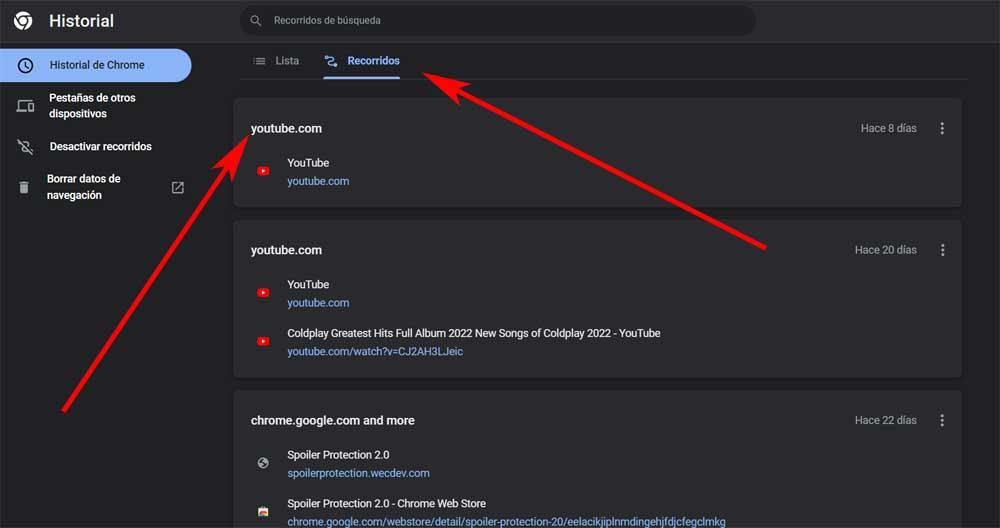
Specifically, we refer to the feature called tours that we found in Google Chrome. Undoubtedly the main advantage that this functionality offers us is that we find ourselves with a series of entries based on our own browsing history, but organized in a different way. To give us an idea, here we will see said history and the searches carried out in, but in this case, all of it organized by topics.
In this way, all this is presented through a series of well-differentiated sections based on the websites visited. While the conventional history prioritizes dates, here, in Tours, URLs are given more importance. This will allow us to find a specific previous browsing activity or check related searches we did in the past. Obviously this is something that becomes especially useful if we have been working with this browser for many months or even years. To take a look at this function, all we have to do is go to the History section from the main Chrome menu and click on the tab called Tours.