If you recently updated your OnePlus Nord 2 to OxygenOS 13 and found yourself stuck at the Google verification screen, you’re not alone. Many OnePlus users face the notorious Factory Reset Protection (FRP) lock after system updates or factory resets.
While FRP is designed to protect your device from unauthorized access, it can quickly turn frustrating when you need to regain control of your phone.
This article explains why FRP on OnePlus devices is uniquely complex, why traditional bypass methods often fail, and how Android phone unlocker Dr.Fone provides a reliable, safe solution tailored specifically for OnePlus smartphones.
Navigation:
Part 1: What Makes FRP on OnePlus Different
Part 2: How Dr.Fone Bypasses OnePlus FRP Safely
Part 3: Qualcomm vs. Mediatek – What You Need to Know
Part 4: Post-Unlock Integrity Checks & Best Practices
Part 1: What Makes FRP on OnePlus Different
Factory Reset Protection on OnePlus phones is special because of its unique software and hardware security. Unlike many Android brands that use basic Android, OnePlus adds its own OxygenOS on top of the Android Open Source Project (AOSP). This adds extra layers to make FRP more complex.
OxygenOS Architecture
OxygenOS is a mix of basic Android and special OnePlus features. This makes the phone better but also adds strong security. One key security part is TrustZone validation. It works in many areas, like ABL (Android Bootloader) and xBL settings. TrustZone makes sure only approved and untouched software can start. This makes bypassing FRP much harder.
Hardware-Specific Variables
OnePlus devices come with different chipsets that directly affect FRP behavior and bypass methods:
- Qualcomm (Pro series)
These phones use Emergency Download Mode (EDL) for flashing and recovery. But since 2021, OnePlus has locked EDL access more. Now, you need special authorized tokens or accounts to unlock it. This makes normal EDL-based FRP bypass very hard or impossible without special tools.
- Mediatek (Nord series)
Devices in the Nord lineup depend on Preloader mode to communicate with flashing tools. Preloader access is essential for flashing or unlocking, but it is often misconfigured, especially on custom ROMs or unofficial firmware. This misconfiguration can cause handshake failures during flashing or even lead to permanent device bricking if handled improperly.
What Triggers FRP on OnePlus
FRP usually turns on when someone does a factory reset without removing the linked Google account first. OnePlus phones have extra security checks that use hardware security flags and software checks to enforce FRP.
OxygenOS updates, system resets, or installing unauthorized software (ROMs) can trigger FRP. When this happens, the phone locks until you enter the original Google account info.
Because of special OxygenOS security and chip rules, the OnePlus FRP bypass is harder than on many other Android phones.
Part 2: How Dr.Fone Bypasses OnePlus FRP Safely
Dr.Fone is a trusted tool that helps unlock Android phones safely and quickly by bypassing Factory Reset Protection (FRP) locks. It is especially good at unlocking OnePlus phones using smart methods that keep the device safe and protect your data while unlocking.
- Model-Specific Intelligence
Android phone unlocker Dr.Fone uses intelligent algorithms to dynamically detect the underlying chipset of the OnePlus device, distinguishing between MediaTek (MTK) and Qualcomm processors. This chipset detection is crucial because different hardware architectures require tailored unlocking procedures.
- Adaptive Patching Logic
Dr.Fone knows that OnePlus has many different models like Nord, Pro, and older ones. It changes how it works depending on which model you have. This way, the unlocking process fits each phone’s special firmware and security rules, making it work better and safer.
- Preserves Security Features
Unlike many bypass tools that make the device less safe, Android phone unlocker Dr.Fone keeps the phone’s Widevine L1 certification. This is important for watching HD videos on apps like Netflix. It also doesn’t break Google’s SafetyNet, which protects banking apps and other important apps. This way, the phone stays fully working and secure after unlocking.
OnePlus FRP Bypass Process
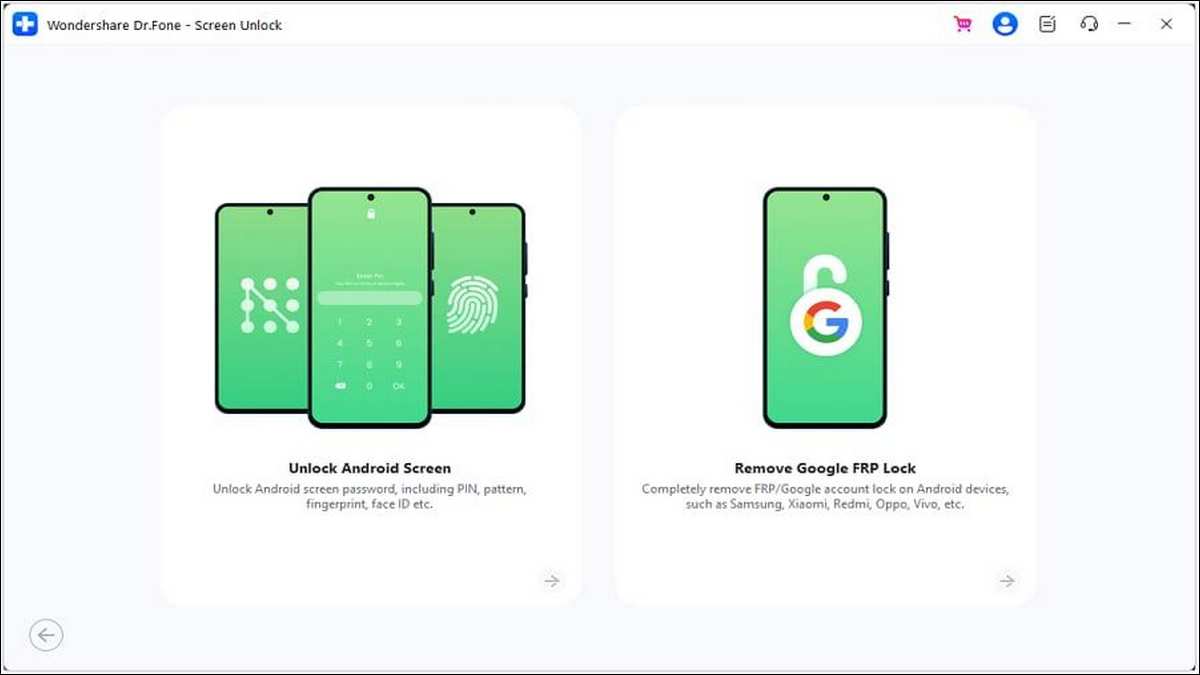
Step 1: To start the process of the OnePlus FRP bypass, Open Wondershare Dr.Fone, go to Toolbox > Screen Unlock, and select Android.
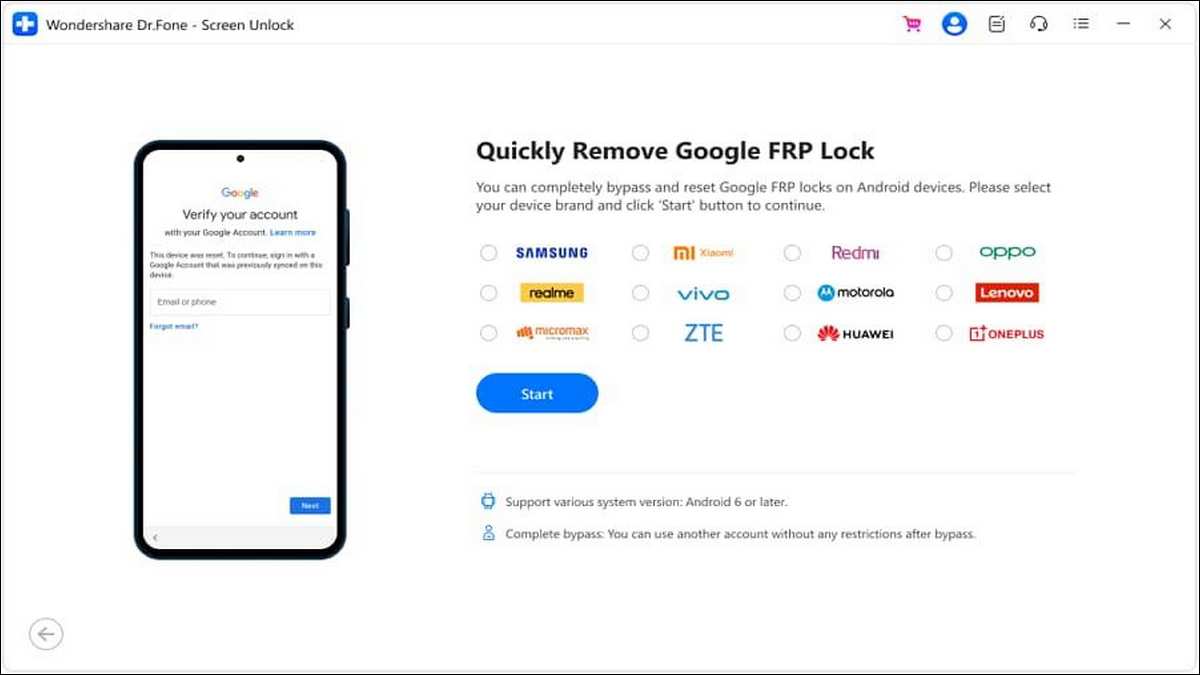
Step 2: Choose Remove Google FRP Lock, then pick your device brand from the list.
Step 3: Dr.Fone will download the necessary driver automatically.
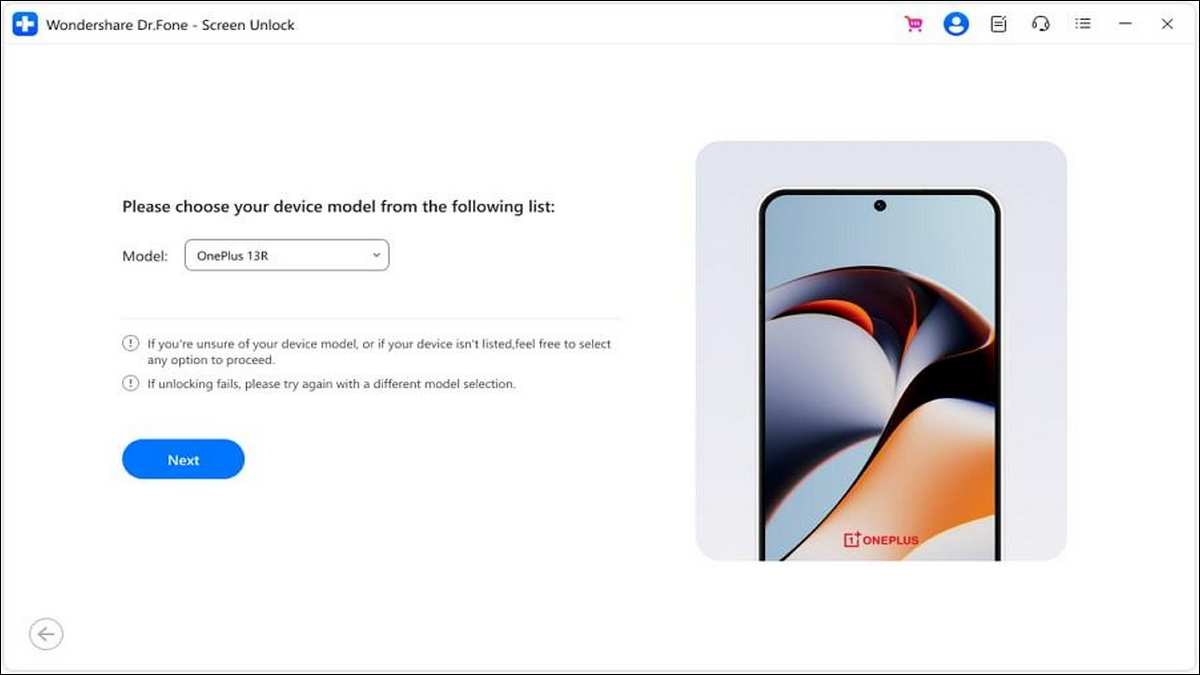
Step 4: Power off your phone and connect it to the computer while holding both the Volume Up and Volume Down buttons for about 3 seconds. For some brands, select the exact model to proceed.
Step 5: Wait for the FRP lock removal process to complete, then tap Done.
Part 3: Qualcomm vs. Mediatek – What You Need to Know
When dealing with FRP bypass on OnePlus devices, understanding the differences between Qualcomm and Mediatek chipsets is crucial. Each chipset brings its own challenges and requires specialized handling to remove the FRP lock safely.
OnePlus Qualcomm Devices (Pro, T series)
Qualcomm-powered OnePlus phones primarily use Emergency Download Mode (EDL) for flashing and recovery. Since 2022, OnePlus has tightened security by locking down EDL access, requiring authorized MSM tool tokens to perform any flashing operations. This restriction makes traditional EDL-based unlock methods ineffective for most users.
Challenges:
EDL mode locked after 2022 models.
MSM tools demand authorized token authentication, inaccessible to general users.
Dr.Fone Advantage:
Dr.Fone circumvents these obstacles by not relying on EDL or authorized MSM accounts. Instead, it uses ADB-enabled recovery patches to safely and effectively bypass FRP. This approach eliminates the need for risky token authorizations and reduces the chance of bricking or data loss.
OnePlus Mediatek Devices (Nord, CE series)
Mediatek-powered OnePlus devices rely on Preloader mode for flashing and recovery. However, patched ROMs often cause Preloader handshake failures, making unlocking attempts unstable. Additionally, using tools like SP Flash Tool without proper safeguards carries a high risk of permanently bricking the device.
Challenges:
Preloader handshake frequently fails on modified firmware.
High brick risk when flashing with SP Flash Tool improperly.
Dr.Fone Advantage:
Dr.Fone’s OnePlus FRP tool can safely find the Preloader mode on Mediatek OnePlus phones. It also automatically picks the right device tree during the unlocking process. This smart method helps unlock the phone safely and lowers the chance of hard-bricking (breaking) the device.
Part 4: Post-Unlock Integrity Checks & Best Practices
Successfully removing FRP is just the first step. It is also just as important to make sure your OnePlus device remains secured against upcoming FRP locks and retains its whole functionality.
Preserve Device Functionality
After unlocking, run diagnostic tests such as:
*#2664# — To perform a touchscreen test ensuring display responsiveness.
*#808# — For comprehensive hardware testing covering sensors, cameras, and other components.
Use software like DRM Info to check your device’s Widevine DRM status. Make sure it is still at level L1.
Keeping Widevine L1 is important for financial apps to work safely. It is also needed for watching HD videos on Netflix and Hulu without problems.
Avoid Getting FRP Locked Again
To prevent the inconvenience of repeated FRP locks:
- Always remove your Google account from the device before performing any factory resets or flashing operations.
- Register your OEM ID if you intend to mod or flash custom ROMs, which helps maintain device integrity.
- Use OxygenOS’s official “local update” feature instead of sideloading firmware, as it preserves important security flags better.
- Avoid flashing unauthorized ROMs or kernels that might compromise bootloader checks and TrustZone.
Conclusion
Bypassing FRP on OnePlus phones is hard because OxygenOS has strong security. The phone’s hardware also adds extra limits. For OnePlus phones with Qualcomm chips (like Pro and T series), EDL mode is locked, and you need special tokens to flash software.
For phones with Mediatek chips (like Nord and CE series), it is hard to safely access the Preloader. There is also a big risk of bricking the phone (making it stop working).
Android phone unlocker Dr.Fone’s smart FRP bypass tool solves these problems. It uses ADB-enabled patches for Qualcomm phones and safely detects the Preloader on Mediatek phones.
This helps unlock the phone safely without harming important features like Widevine L1 (for video quality) or SafetyNet (for security).