Bottom Line Up Front: This guide delivers practical, free methods to download Vimeo videos directly to your device. Whether you’re using a PC, Mac, iPhone, or Android, we’ve tested and compiled the most effective solutions for you.
Learning how to download Vimeo videos can be essential for offline access, and we’ll cut through the confusion. This article provides clear, actionable steps on how to download videos on Vimeo efficiently, saving you time and effort. Let’s dive into the simplest ways to get your favorite Vimeo content onto your personal devices.
Part 1. Why Download Vimeo Videos?
Vimeo hosts a vast library of high-quality content, from independent films to professional tutorials. Downloading these videos is incredibly useful for several reasons:
- Offline Viewing: Perfect for commuting or areas with poor internet
- Content Archiving: Save valuable videos for future reference
- Educational Use: Keep training materials for repeated review
Using a service to download Vimeo video online ensures you have permanent access, preventing the frustration of a video being removed or made private later.
Part 2. Challenges and Solutions for Downloading Vimeo Videos
Common Challenges:
- Limited Download Options: Vimeo only allows downloads if the uploader enables it
- Complex Processes: Many methods are unnecessarily complicated
- Security Risks: Malware threats from untrustworthy sites
Solutions:
- Use reputable tools with positive reviews
- Avoid sites with excessive pop-up ads
- Choose specialized software like Vsave for security
Part 3. Easy Methods for Downloading Vimeo Videos
1. Download Vimeo Videos Using the Official Website
If the video creator has enabled downloads, Vimeo provides a simple option to download videos directly from the platform. Look for the Download button below the video player. By clicking it, you can select the resolution you prefer, and the video will be saved to your device. This method works well for Vimeo content that allows downloads.

2. Using Software Tools for Downloading Vimeo Videos
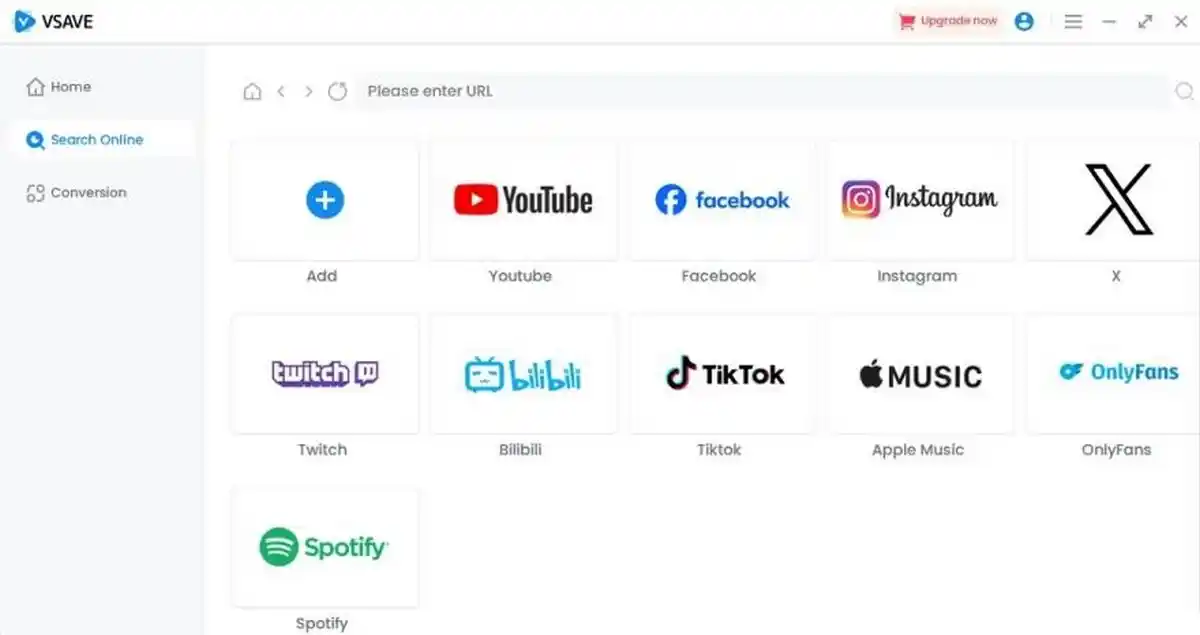
For a more reliable and feature-packed option, consider using Vsave Video Downloader. Available for Web, PC, iOS, and Android, Vsave allows users to download Vimeo videos with just a few clicks. Whether you’re on a desktop or mobile device, it ensures high-quality downloads with fast speeds. With its free basic features, Vsave provides a straightforward solution for downloading Vimeo videos across all platforms.
Key Features of Vsave:
- Cross-Platform Compatibility: Supports downloading content from over 1000 websites, including YouTube, TikTok, Spotify, and more. Whether it’s videos, audio, or social media content, Vsave handles it all in one tool.
- Batch Downloading for Playlists & Albums: Effortlessly download entire playlists, channels, or music albums in a single click, saving you time and effort.
- High-Quality Downloads: Retain the original quality of your content with options up to 4K video resolution and 320kbps audio for crystal-clear playback.
- Speed, Simplicity & Ad-Free Experience: Enjoy a smooth, ad-free process. Just paste the URL and download your files quickly, without any interruptions or unwanted ads.
- One-Click Format Conversion: Easily convert your downloads to any video or audio format suited for your devices, ensuring compatibility and convenience.
- This method offers a seamless experience, making it ideal for anyone who frequently downloads Vimeo videos.
How to Download Vimeo Videos with Vsave:
Step 1. Download and Install Vsave: Start by installing Vsave on your PC. Or install Vsave Video Downloader App on your Android/iPhone.
Step 2. Copy the URL: Go to Vimeo, find the video you want to download, and copy its URL from the browser’s address bar.Step 3. Paste the URL into Vsave: Open the Vsave app on your PC, click “Paste download,” and paste the video link.
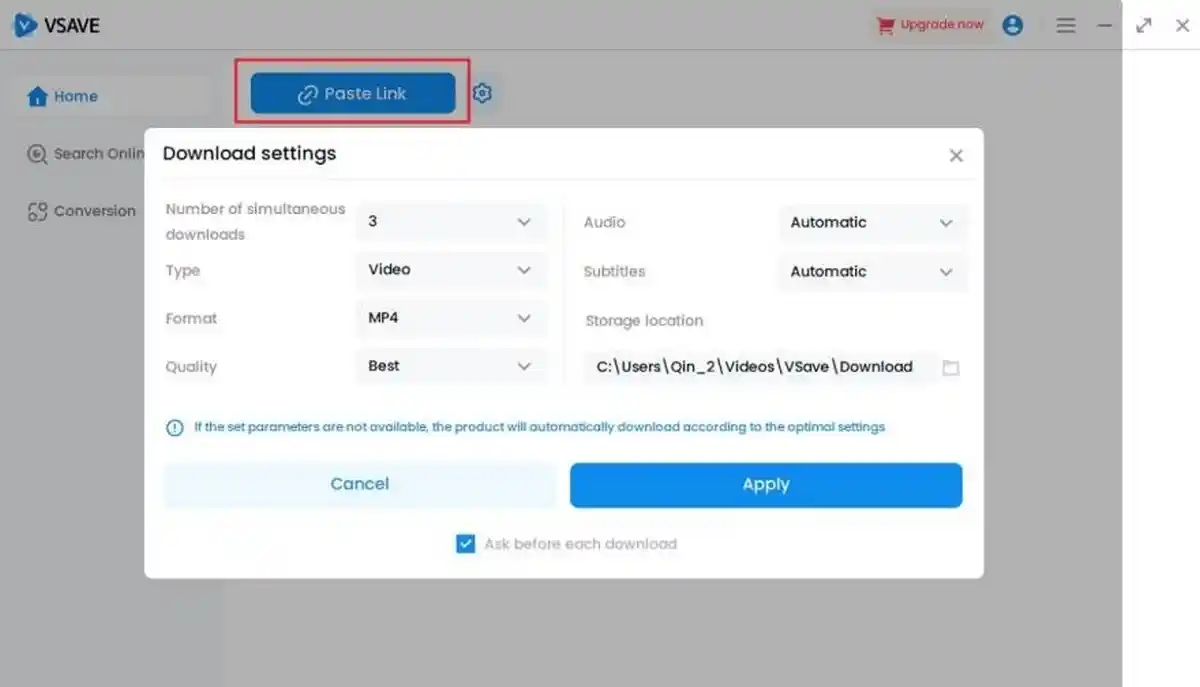
Step 4. Customize Your Settings: Choose your desired video format and quality before clicking the “Download” button.
Step 5. Download Complete: The video will be saved directly, ready for offline viewing.
Download Vimeo Videos Using Online Tools
For videos without a download button, online tools like SaveFrom.net or ClipConverter can be handy. These websites allow you to paste the video URL into a field, choose your desired format and quality, and download the video in a few easy steps. These tools are especially useful for users who prefer not to install additional software.
Part 4. Best Practices for Safe and Legal Downloading
Legal Considerations:
- Respect copyright and Vimeo’s Terms of Use
- Download only for personal, offline viewing
- Do not redistribute without permission
Safety Tips:
- Use trusted tools like Vsave
- Avoid sites requiring personal information
- Keep antivirus software updated
Part 5. FAQs About Downloading Videos from Vimeo
Q1: Can I download all Vimeo videos for free?
No. The ability to download a video depends entirely on the privacy settings and permissions set by the video’s uploader. If the download option is disabled, Methods 2 and 3 are your primary alternatives.
Q2: Is it safe to use third-party tools for downloading Vimeo videos?
Safety varies. While many are safe, some can pose risks. Always use reputable tools with positive user reviews. Software like Vsave Video Downloader, which is transparent about its functionality, is generally safer than obscure online portals filled with pop-up ads.
Q3: How can I download Vimeo videos on my iPhone or Android?
The process is similar across devices. For iOS and Android, we recommend using a dedicated app like Vsave.
Part 6. Conclusion
Downloading Vimeo videos doesn’t have to be difficult. We’ve outlined the easiest methods for 2025, from the official download button to versatile online tools and robust software like Vsave Video Downloader. The key is to choose a method that balances ease of use with security. For a consistently reliable experience across all your devices, Vsave Video Downloader stands out. Ready to save your favorite videos? Try Vsave today and enjoy seamless, high-quality downloads with ease.