Steps to control logins
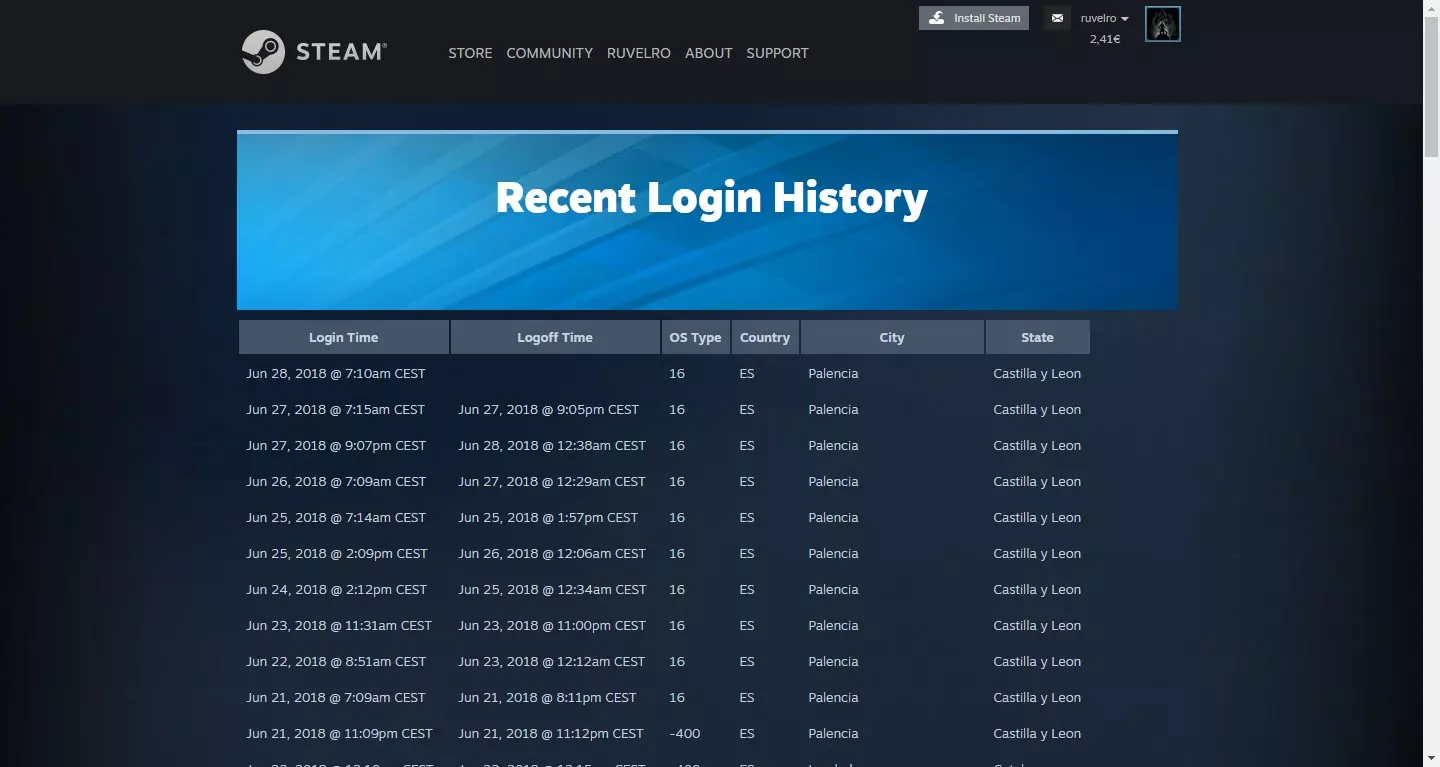
The company offers different options related to security. In addition to informing about how much money we have spent in this store, we can also see a history with the logins. This can give us clues as to when an intruder has been able to enter and be able to take action as soon as possible.
Besides knowing when have we connected, we can see how long. We will also see from which operating system the session was started, something that can also alert us in case we do not recognize that access.
The first thing we have to do is access the Steam account and this link with our data. There we will see a complete list with all the historical logins on the platform. We will see where they have been from and the closing time.
This function is very useful, since in case we detect a suspicious login, we can take action before it’s too late. The most important and quick thing would be to change the password. It is something that we can take into account and review periodically to avoid unpleasant surprises that could steal our account.
Tips to protect your account
Beyond this function that we have talked about, it is important to take into account some essential factors to protect the Steam account. The objective is none other than to correctly protect our data and prevent anyone from entering. Not only will the account itself have to be protected, but also the systems and devices that we are going to use to play.
Create a strong password
The first thing to keep in mind is the importance of create a password that is strong. It is not worth putting any password. You have to avoid the typical ones that many users usually put and which is a serious error, such as 123456 and the like. Also avoid putting our name, surname or date of birth.
Ideally, create a password that is totally random, consisting of letters (both uppercase and lowercase), numbers, and other special symbols. All this, in addition, taking into account the length. Each additional character is going to make that password exponentially more secure.
Enable two-step authentication
This is something that is increasingly present in different online services. We can also use it on Steam. We can enable 2FA and in this way add an extra layer of security to prevent an intruder from accessing our account even if they had previously found out the password.
Two-step authentication is a method that forces us to enter a code or verify our identity when logging in, beyond the password. For example, when we open the account on a new device, it will ask us for that code that we are going to receive by SMS or by some 2FA application.

Beware of third party sites
Must have care of the sites from where we log into our Steam account. Each login creates tokens that can be used to steal our data. We must always access through official sites and also avoid public wireless networks, since we do not really know who has created it.
This must also be taken into account when downloading a game or making a payment. It is essential to always do it from official sources and not make any mistake that could expose our personal information.
Use security programs
Of course, our systems must be protected with a good antivirus. In Windows, for example we can use Windows Defender, Avast, Bitdefender and similar options. It doesn’t matter which one we choose, but we do have to make sure it works well. This will prevent the entry of viruses and scan the system for threats.
But beyond the antivirus itself, we can also use other applications such as a firewall or even extensions for the browser. In all these cases, the goal is to maintain security at all times.
Have up-to-date equipment
On the other hand, it is also important that the operating system, the applications or browsers that we use, are updated correctly. This will correct any vulnerability that may appear. There are many occasions when bugs appear that are exploited by hackers and manage to access accounts.
We must always have the latest versions installed. It does not matter what operating system we use, what browser or applications. We must always have all the patches installed and thus avoid leaving gaps that can be used by cybercriminals.
Ultimately, protecting your Steam account is very important. We have seen a feature to view the logins and we have also given some important tips to protect the account and prevent an intruder from accessing it. The same can be applied to any other online account that we use.