Has this ever happened to you? You were checking your SD card and you hit format. Maybe by habit, maybe by mistake, maybe your kid grabbed the camera. Either way, the card’s empty now and your stomach’s somewhere near your shoes.
Take a breath first. A format – especially the quick kind most cameras run by default – usually doesn’t torch your photos on the spot. It just tears out the index card told the camera where to look. The pictures are often still sitting there on the flash memory, waiting. That gap between “looks gone” and “is gone” is where tools like Stellar Photo Recovery earn their keep.
No promises, though. Whether this works depends on what kind of format you ran, whether you’ve touched the card since, and how the card’s holding up physically.
What a Format Actually Does
Picture a library where someone ripped out the card catalog but left every book on the shelf. That’s close to what happens during a quick format. The camera or your computer rebuilds the file system’s bookkeeping – the FAT or exFAT tables, the directory entries – but the actual photo data usually just… sits there. Untouched. For now.
Say your card had 2,000 shots on it, a mix of RAW and JPEG. Format it, and the camera reports zero files. Doesn’t mean zero photos exist. It means the camera lost the map. Stop using the card right then and there’s a real shot at getting most of it back.
A full or secure erase is a completely different animal – that one actually overwrites the storage. If that’s what happened, software usually can’t help you.
Stop Touching the Card
I can’t stress this enough. Whatever you do next, don’t use the card.
No new photos. No copying files onto it. No reformatting “just to see.” No repair utilities poking around and rewriting things. Every byte you add is a byte that might land on top of the photo you’re trying to save.
Pull the card, grab a card reader, and connect it to a computer instead of leaving it in the camera.
Will This Actually Work?
Often, yes. Especially with a quick format and a card you haven’t touched since.
Recovery software basically does one of two things. Sometimes there’s enough of the original file system left that it can just reconstruct the old directory structure – this is file-system recovery, and it’s the cleaner of the two.
This is where Stellar Photo Recovery software comes into play. This photo recovery software is designed to recover lost/deleted/formatted photos videos and audio files from any storage device. It supports recovery from SD cards, USB drives, hard drives, SSDs, and other storage media used by cameras and digital devices.
The software supports a wide range of RAW and standard photo formats from popular camera brands.
Its advanced scanning technology can help recover files after accidental deletion, formatting, corruption, or storage media errors. Stellar Photo Recovery also lets users preview recoverable files before saving them to a safe destination.
Trying the Recovery with Stellar Photo Recovery
Connect the card. Card reader, computer, done. If your OS immediately asks to format it again – don’t. Cancel that dialog and move straight to the recovery software.
Open Stellar Photo Recovery. It scans below the level your normal file browser operates at, which is exactly why the card can look empty in Finder or Explorer while still holding recoverable files underneath. Pick the card from the device list.
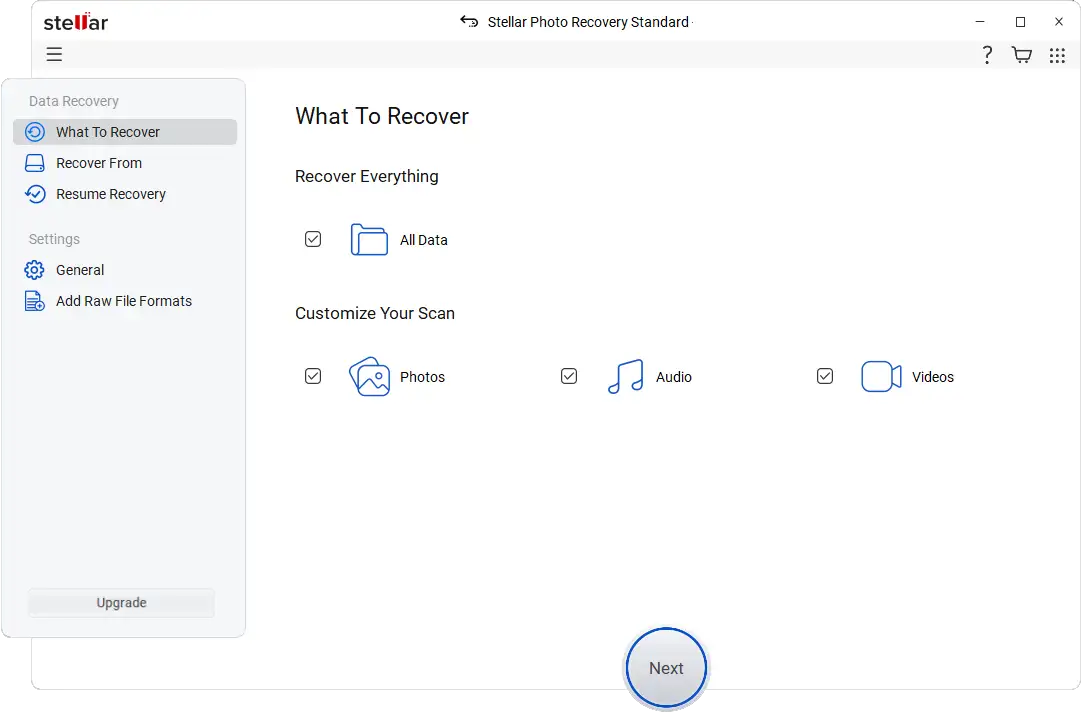
Choose file types. Know roughly what was on there? Select it specifically – JPEG, TIFF, or your camera’s RAW format (CR3, NEF, ARW, RAF, ORF, RW2, take your pick). Narrower search, faster scan. Not sure? Cast a wider net and let it search broadly.
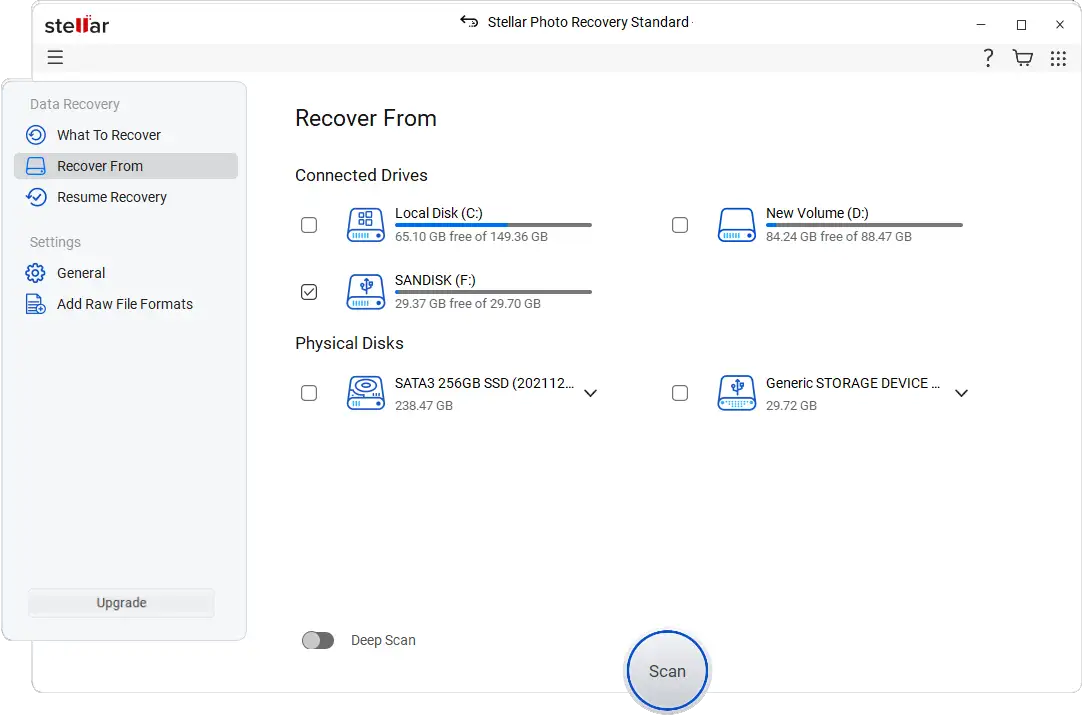
Run the scan. A standard scan is fast and often enough for a card that was just formatted. Nothing showing up? Switch to Deep Scan. It takes longer — sometimes a lot longer, depending on card size and reader speed – because it’s hunting for file signatures instead of relying on any leftover directory info.
Preview everything before you save it. This step matters more than people think. A filename appearing in your results doesn’t guarantee the image data behind it is actually intact – especially with RAW files. Open the preview. Check it looks right.
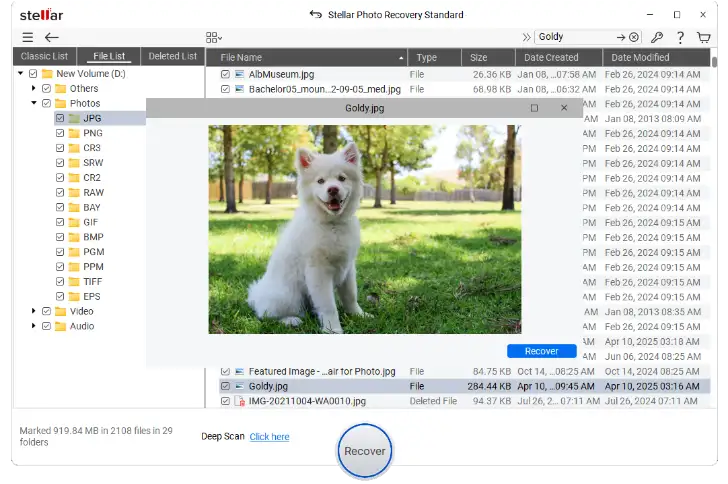
Save to a different drive. Not the card. This one trips people up constantly. Recovered files go on your computer’s hard drive, an external SSD, anywhere except the card you’re recovering from. Write to that card now and you risk overwriting data the software hasn’t pulled off yet.
Formatted It More Than Once? Still Not Necessarily Doomed
Multiple formats don’t automatically mean the photos are toast. What actually matters is whether you wrote real data to the card between formats. Reformatted it a few times without ever storing anything new? There’s still a decent chance the original data’s intact underneath – run a Deep Scan and see.
Results here get unpredictable, though. Flash memory has its own quirks. Fragmentation happens. Camera system files clutter the scan. Controller-level operations can shuffle things around in ways that are hard to predict. Treat recovery as a strong possibility, not a sure thing.
What If It’s Not Just Formatting – the Card Seems Broken
Sometimes the problem isn’t a format at all. File-system corruption, bad sectors, a damaged partition — any of these can make a card look inaccessible without you ever hitting format.
Computer won’t detect the card at all? Check the connection first. Try a different reader, a different USB port. If nothing detects it anywhere, you’re probably looking at a hardware failure, not a software fix.
Card shows up but looks blank, or asks to be formatted, or reads as RAW? Recovery software can usually still get underneath that. But if the card’s physically damaged – cracked, water-exposed, whatever – a professional recovery service beats hammering away with software over and over.
Bottom Line
A format rearranges the card’s index. It doesn’t necessarily touch the photos themselves – not right away, anyway. That’s the whole reason speed matters here. The second you realize what happened, stop writing to the card and start the recovery process.
Stellar Photo Recovery can dig through a formatted card two ways – leftover file-system clues, or raw signature scanning – and it covers a long list of photo and RAW formats your camera can no longer see on its own. But nothing’s guaranteed once data’s actually been overwritten, or once the memory itself has failed. So: stop using the card, don’t write anything new to it, and start the recovery as soon as you possibly can.