Easily check for intruders on Wi-Fi
You will have different ways to check this. For example, the usual thing is to enter the router configuration and there see the devices that may be connected. You can also notice it if the connection starts to go wrong or you see that you try to connect and it appears that the password is incorrect. But we are going to show you a simple and fast option.
It is about installing a mobile application which is called Fing. It has several uses and it is not only useful for this, since it also helps you obtain information from your network or have data to solve certain problems. But for our purpose, which is to know if there is an intruder connected, it is very useful.
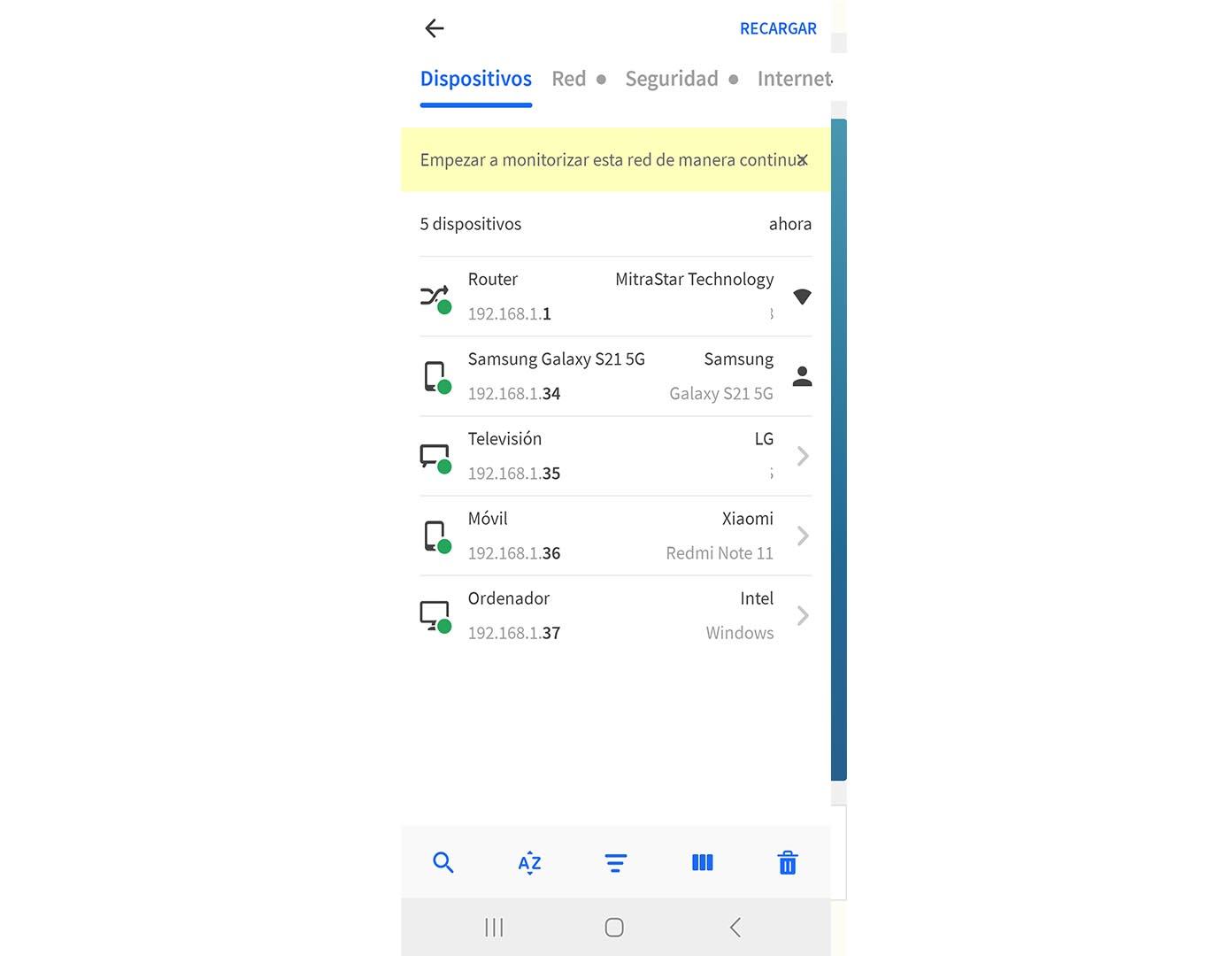
What you have to do is install the application on the mobile. Is free. Once you have it installed, you will see at the top the name of the network to which you have connected. Basically it will be the name of the Wi-Fi that your local network has. Below you can see the connected devices. If you click there you will get information.
First of all, you will see the router itself, but also each of the devices that are connected to that network. In some cases you will be able to see the name of the specific model, while in others it will only appear if it is a mobile phone, computer, television, etc. You will also see the IP adress from each of them.
Therefore, as you can see, it is very easy to know which devices are connected to a network. In case you see one that does not fit you, it could be an intruder. Of course, think that any device that you have connected, even if you are not using it at that moment, will appear. This also includes IoT devices, for example.
What to do if you see intruders
If you have seen that there are intruders on the network, the next thing will be to take measures to solve the problem. Maybe you have a weak key or there is a bug in the firmware of the router that has exploited to gain access. You will need to take steps to oust such intruders and prevent them from re-entering your network.
The first thing will be change Password of Wi-Fi. We recommend that you put a totally random one, that you do not use anywhere else and that it has a suitable length. Put a mix of a little bit of everything, like letters (both uppercase and lowercase), numbers, and other special symbols.
you should too check if the router is up to date or not. For this you will have to enter the router configuration, which is usually through 192.168.1.1 and enter the data. Some models update themselves, while others have to be done manually. It is important to always have the latest version installed.
In short, as you can see, it is very easy to detect intruders on the Wi-Fi network. You simply have to install Fing on your mobile and see the devices that are connected. Although there are more advanced methods and with which you will be able to have more information, such as knowing the Wi-Fi channel you are using, for something basic it is very useful and easy to use.