As for content-based parental control, we still have the possibility of adding up to 24 URLs, which is insufficient for good parental control. However, we will always be able to use DNS servers with integrated parental control and antimalware, such as Cloudflare or OpenDNS In addition, we could also use NextDNS that incorporates very advanced features in order to provide parental control, antimalware and also control of all the sites that we want.
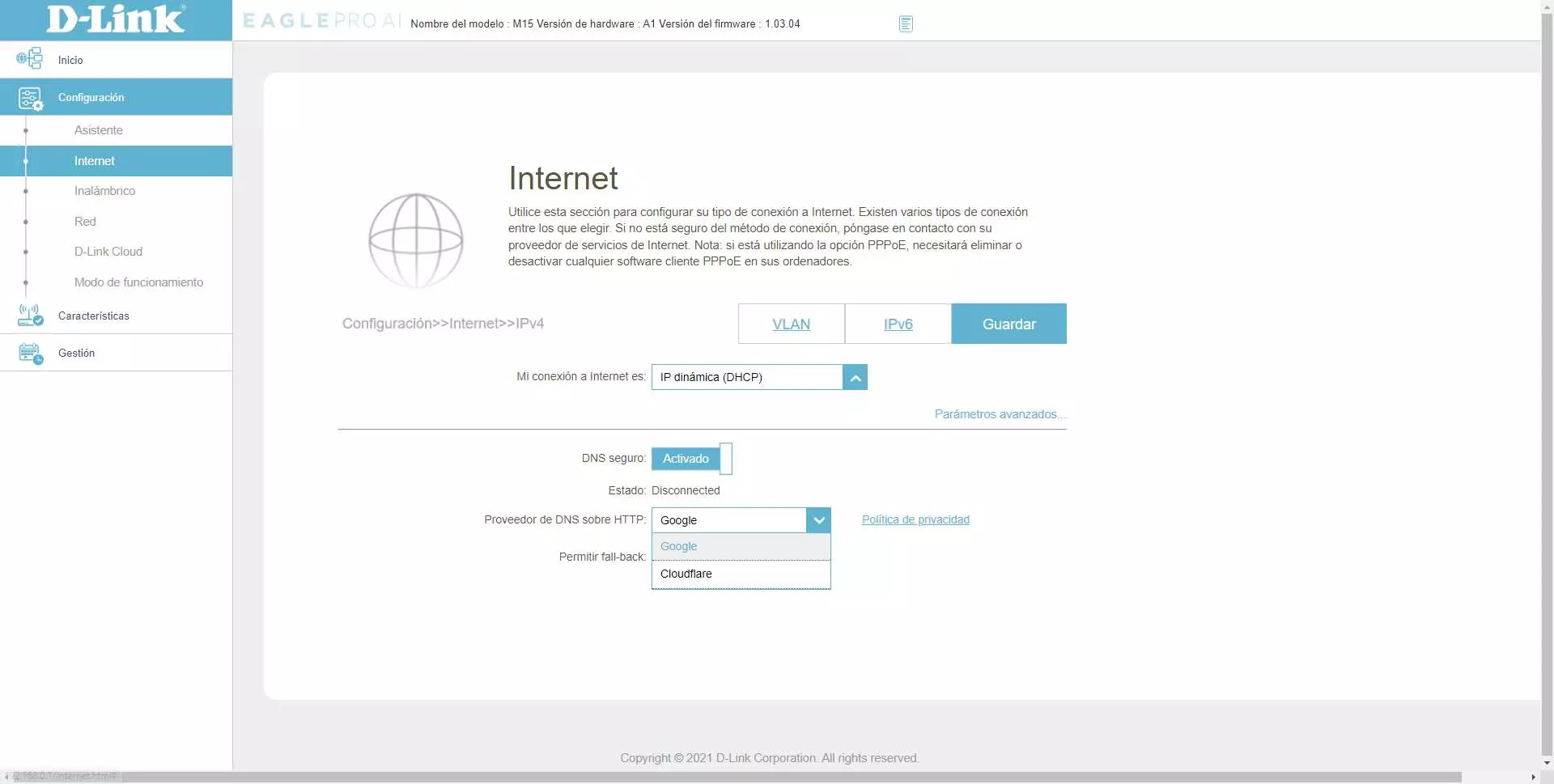
DNS over HTTPS
By default, the DNS protocol used for resolution of all Internet domains uses the transport layer protocol UDP on destination port 53. All request and response traffic is not protected by any type of encryption or encryption. authentication, any malicious user could redirect us to any website specifically designed to steal our information, it could also allow operators to block certain web pages that we try to access.
The DNS over HTTPS (DoT) protocol allows us to ensure that communication from our router to Google’s or Cloudflare’s DNS server is completely encrypted point-to-point, in this way, we will have greater privacy and security when browsing the Internet, because these requests cannot be “snooped on”. Also, carriers would also not be able to block DNS over HTTPS because they will block all HTTPS requests to Google or Cloudflare. This functionality is really interesting, since other manufacturers, instead of incorporating DNS over HTTPS, integrate DNS over TLS, which can be easily limited, since it uses the TCP protocol on port 853.
AI-based mesh network optimization
The manufacturer D-Link has incorporated a kind of AI that is in charge of continuously monitoring the WiFi wireless network to provide the best possible performance, it will be in charge of changing the channels whenever there are interferences with other wireless networks, and we can even obtain reports about the operation of the WiFi network and if there is any kind of problem that we should know about.
Of course, the Smart Steering and Smart Roaming functions are still present in this new WiFi Mesh system, and this extends to the rest of the equipment such as WiFi routers and repeaters, because they are all from the same family and will be perfectly integrated into the mesh network. The firmware will allow us to configure the WPA3-Personal security protocol to have the best possible security, but if you activate this security all your wireless clients must support it, otherwise you will not be able to see the WiFi wireless network, much less connect to it. Currently it is recommended to choose WPA2/WPA3-Personal, although it is not more secure than WPA2-Personal because it is in a transition mode and an attacker could force to use WPA2 instead of WPA3.
New mobile app
Another very important change in these new equipment from the EAGLE PRO AI family is the application for mobile devices, now it is no longer the popular D-Link Wi-Fi application but is the new app specifically oriented to the installation, management and administration of This teams. This new app is compatible with Android and iOS devices, as you can see here:




The main features of this new application are the same as the previous D-Link Wi-Fi. We will be able to see the entire WiFi network, connected clients, added Mesh nodes, check the connection status, block the devices that we want easily and quickly, configure the parental control of the computer, program Internet access, activate the guest Wi-Fi network and even update all the devices in the WiFI Mesh network. We will also be able to use D-Link Cloud to remotely access the main router, without needing to know the public IP, since we will use the manufacturer’s Cloud for this. Finally, we can activate and synchronize the services of Amazon Alexa and also the Google assistant.
At RedesZone we have recorded a complete video where you will be able to see in detail all the configuration and firmware customization options of the D-Link EAGLE PRO AI M15 model, but the rest of the equipment in the family has exactly the same functionalities and features. In the following video we will show you some of the star features of D-Link equipment, such as the Movistar FTTH triple VLAN and also the L2TP/IPsec type VPN server.
If you are interested in buying one of these devices, do not miss our complete firmware review to learn first-hand about all the available options. When buying a router or WiFi Mesh, not only is the hardware very important, but also what firmware the device has and whether or not we have many configuration options available.