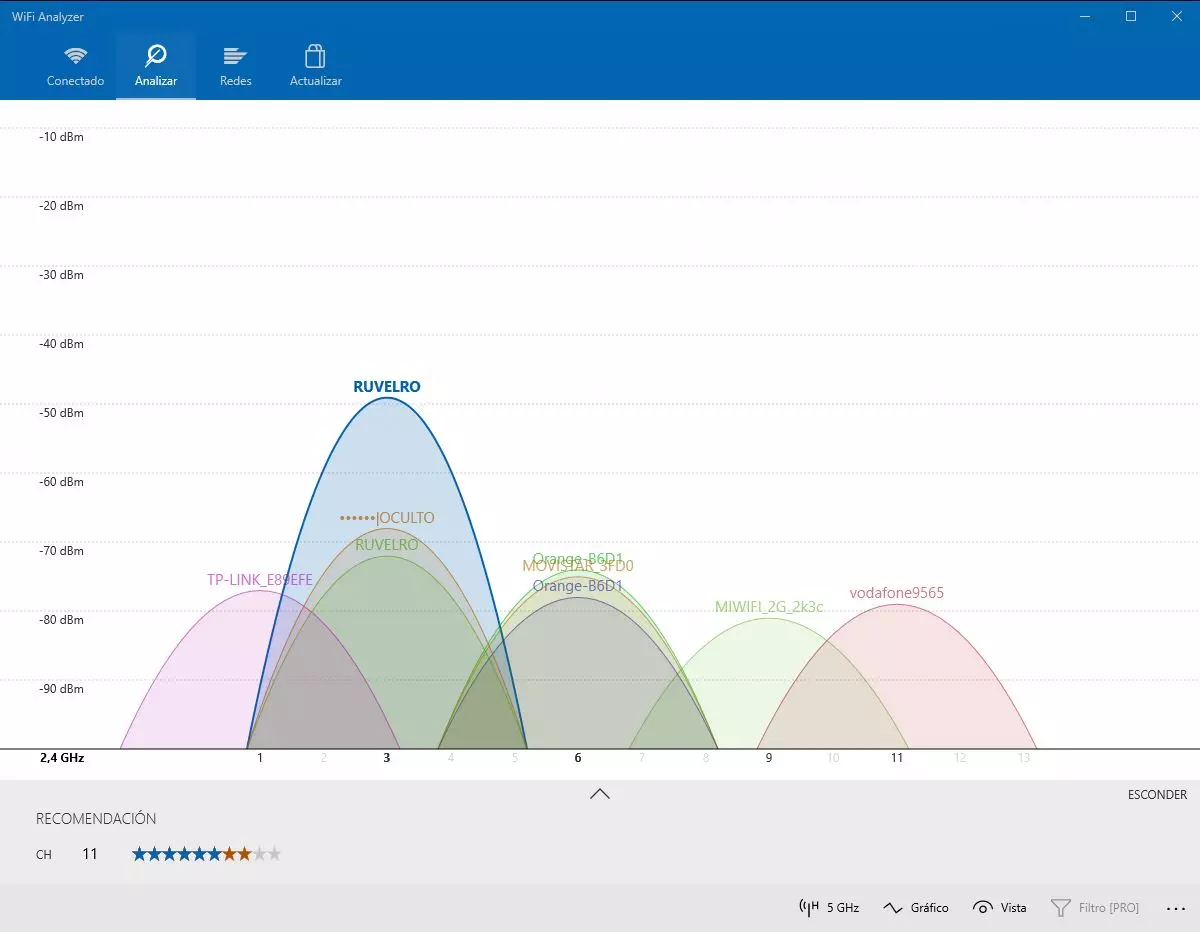
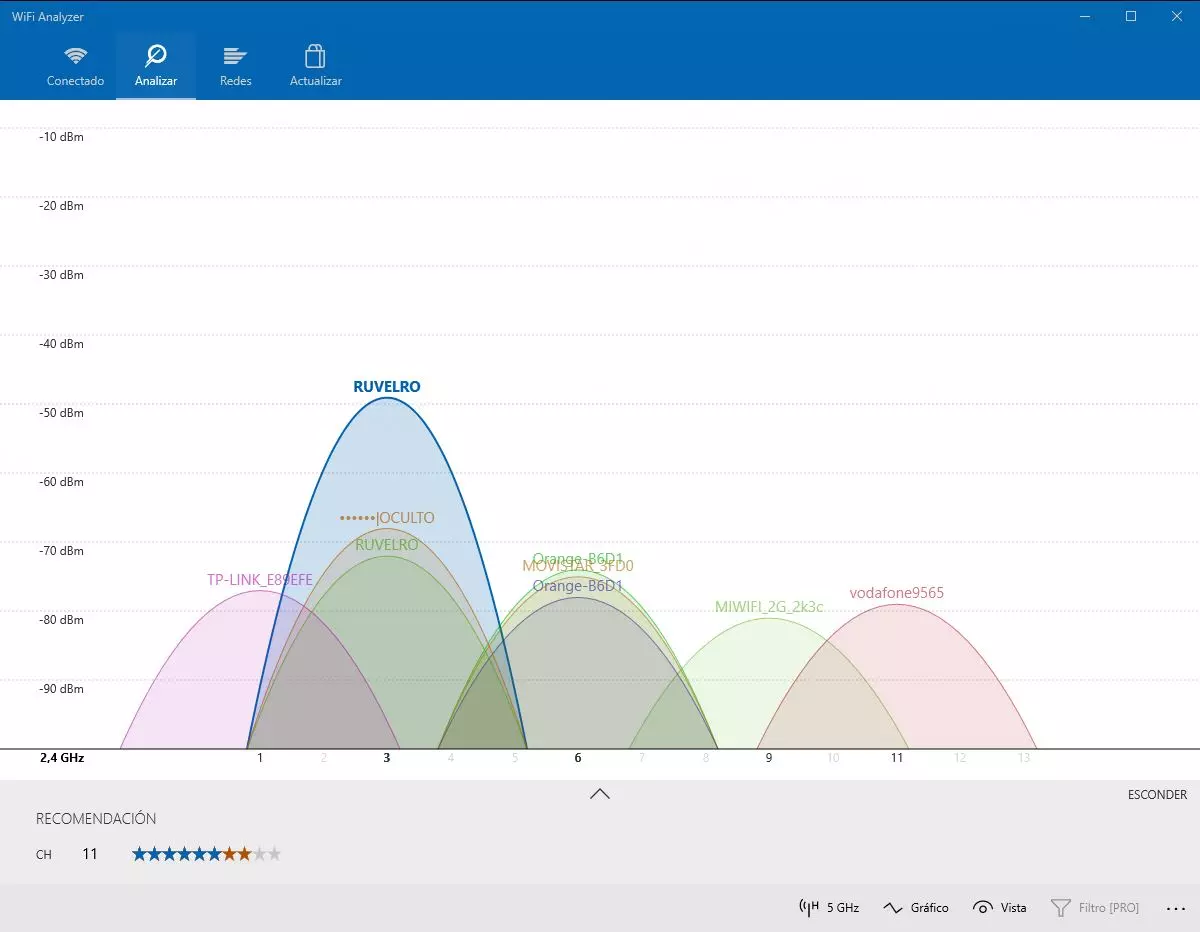
In the case of interference with other WiFi networks, we must bear in mind that the 2.4GHz band has much more range than 5GHz bandFor this reason, our neighbors are interfering with our wireless network. Tools such as Wi-Fi Analyzer or Acrylic WiFi will allow us to know which WiFi channels our neighbors are using, to place our router on a channel that is more or less free of interference.
In this way, we will be mitigating interference from other devices, whether they are household appliances or other wireless WiFi networks.
Physical obstacles
Another factor that we must consider are the physical obstacles. The electromagnetic waves must go through or bounce off the different obstacles until they reach the destination, which are the wireless clients that are connected or will be connected. Thick walls greatly influence WiFi coverage and speed as well. If from where the router is located to the location where we are connecting there are many walls, then the signal will be greatly attenuated and hardly any coverage will reach us. Today in WiFi routers there are two technologies that allow us to improve the behavior of the router when wireless clients are far away:
- MIME: thanks to the use of several WiFi antennas, whether external or internal, the router can simultaneously transmit and receive information through all of them, with the aim of improving the WiFi signal and not depending only on one antenna. Thanks to signal bouncing, the router and clients with the WiFi 4 standard onwards can “rebuild” those signals so that they are not lost.
- Beamforming: This technology introduced with the WiFi 4 standard allows us to “focus” the wireless signal wherever the clients are. Previously, the signal propagated in all directions equally, with Beamforming, based on the bouncing of the signal due to the different obstacles, we can further “refine” the direction where to focus the WiFi wireless signal, to provide more coverage, and therefore , higher speed.
However, MIMO and Beamforming is not enough to mitigate the problem with physical obstacles, and it is one of the most important parts of having good wireless coverage.
If our house is a duplex or a chalet, ceilings and floors interfere a lot in the connection, preventing the signal from reaching the top, so you should place the router near the “shot” of the ladder, so that with signal bounces it is able to cover the top of our house with WiFi. In these cases when we have several plants, it is usually best to buy a WiFi Mesh system, placing a WiFi access point on each floor, in order to have full coverage at home.
Materials such as concrete, cement, kitchen and bathroom tiles, as well as mirrors in hallways or bathrooms or any metal, make the WiFi wireless signal very weak, so you should avoid placing the router near these elements, with the aim that the signal is not attenuated as soon as it leaves the equipment. If we place our router near these elements, added to the interference with other devices, it makes the signal we receive minimal.
Type of WiFi antennas and their placement
Home routers and WiFi Mesh systems incorporate omni directional antennasThese antennas emit the signal horizontally in all directions, that is, 360º. However, depending on the antenna and its gain, the vertical coverage they provide will either have a higher angle of incidence or a lower angle of incidence. Generally, routers have antennas with a gain of about 5dBi, so they have a vertical angle that is around 30º approximately, although it all depends on the antennas.
If you have a router with external antennas and you put the antennas vertically, all the antennas will emit in the same direction, so it would be advisable to place these antennas in different positions to improve global coverage in our home, and make it more homogeneous. In addition, a very important detail is that, if we place the antennas in different positions, we can emit homogeneously in all directions, as if it were a large sphere of wireless coverage, this is ideal for homes with several floors and a single router.
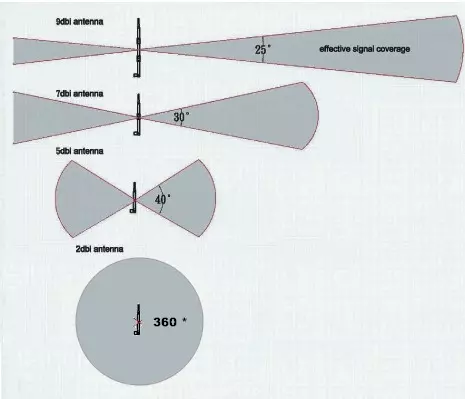
If we want to have the best coverage, we must place ourselves at approximately the same height as the antennas. The worst places would be just below the router and just above the router, because the signal will not arrive directly but through signal bounces, so the actual speed that we will achieve will be lower. If we want to send the Wi-Fi signal to much more specific points, to make a long-distance link, then it may be worth buying sectorial or directional antennas, with the aim that the emission radius is less but the signal focus on this specific area.
If you have a router with internal antennasIt has already been specifically designed by the manufacturer to place the internal antennas in the correct locations and positions to achieve the best coverage in any location. If we disassemble the router we can see that the antennas will be placed vertically and horizontally, to provide coverage in all directions, as if it were a large giant sphere. In these cases, it is best to place the router on a table horizontally, but if the router is designed to be placed vertically, you better place it this way.
Finally, you must bear in mind that the 5 GHz network is much faster than 2.4 GHz network but it reaches less distance, because the signal attenuates more with distance and also with obstacles, compared to the 2.4GHz band that behaves much better in distance and obstacles. If you cannot connect to the 5GHz band from rooms or places that are far away, you will have to choose yes or yes for the 2.4GHz band, although you will get less speed and stability.
Once we have seen all the factors that influence wireless coverage, we are going to give you a series of tips so that you can place the router in the best possible location. We will also indicate where you should never place the router, if you do not want to have coverage problems.
Best places to put the router
If we want to have full coverage in our home with the WiFi router, we must follow a series of recommendations so as not to have any problems, and maximize the wireless coverage that it provides us.
Place it in a centered place at home
The first recommendation that we can give you is that you always place it in a centered place of home so that in all places we have a homogeneous coverage. We should never place it in a corner of our house, because then we will have problems for the signal to reach the opposite side of our home. It is necessary that you place it in a central place, if you must place it in a corridor and you do not have the fiber or coaxial connection wired, then place the router as close to this corridor.
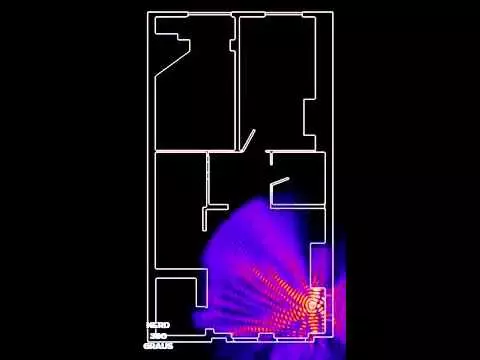
Thanks to the omnidirectional antennas, whether internal or external, we can make the wireless signal reach anywhere in our house in a homogeneous way, something essential to avoid having to place a WiFi repeater.
Where to place it if you have PAU at home
Today with the new construction of houses, we have a PAU (User Access Point), where the fiber optic outlet that goes to the RITI comes from. This is perfect for installers, because they will simply have to connect the fiber that is pre-installed to the CTO and we will have a connection. However, the main problem is that the WiFi router with the integrated ONT must be placed right in this area.
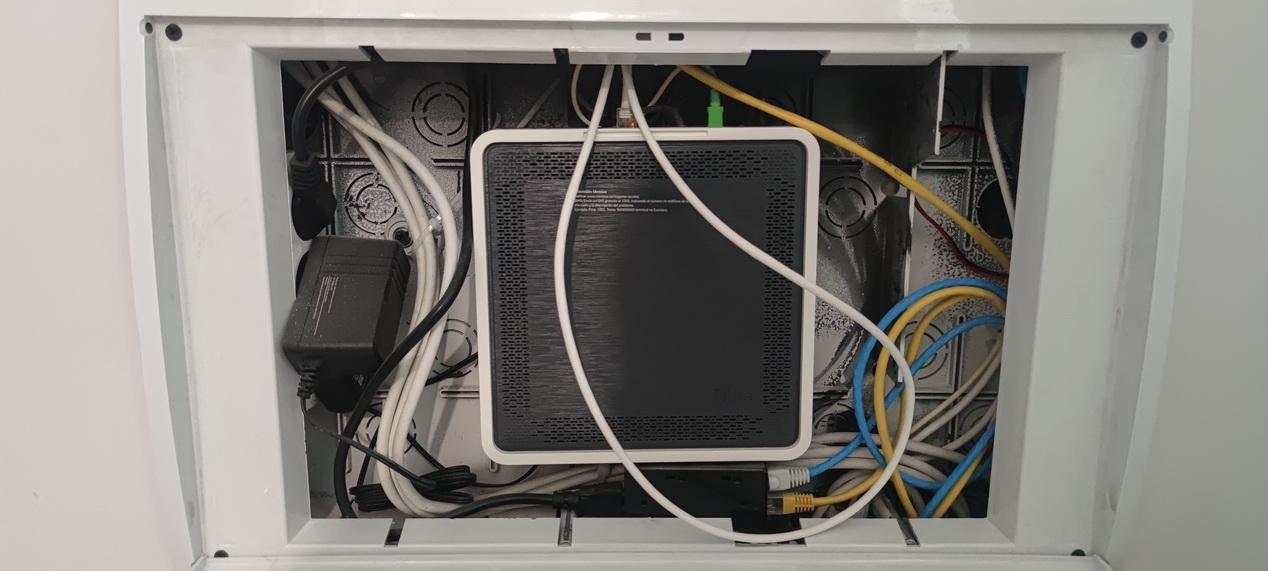
Generally, the PAU is at the entrance of the house, so the recommendation of “as central as possible” will not be fulfilled. Another negative aspect is that the router will be covered, and if you don’t want to see these covers, it will also be covered by a piece of furniture or a mirror, so it will be even worse for our wireless coverage.
The best solution in these cases is to deactivate the WiFi of the router that is in the PAU, and buy a neutral router or a WiFi Mesh system that supports WiFi access point mode, so as not to have two routers and have double NAT, with all the problems that this entails. If we have PAU that means that we have the house wired, so we can locate the WiFi router or the WiFi Mesh system in the living room, in the bedrooms, etc.
Do not put it on the ceiling or on the floor
The router should be placed at a medium height, between 1 m and 1.5 meters high, that is, it should not be on the ceiling or on the floor, the ideal is to place it on a table or furniture, ideally made of wood, without glass or mirrors, and with the least number of obstacles around, especially It should not be close to the TV because it could cause interference with DTT channels by being too close.

If the router has internal antennas and it is placed horizontally, you should never place books or any obstacle right on top, not only will you have less coverage, but it will get much hotter because it does not have any type of cooling.
Position the antennas well
If the router has internal antennas, you will need to position the router horizontally or vertically, depending on the design of the equipment. Operators sell routers that can be placed horizontally, and others are “book” type that must be placed vertically. What you should never do is place objects on or on the sides of the router, in order that we do not have temperature problems or additional obstacles
In the event that the router has external antennas, it is recommended place them vertically and at 45º, in order to provide coverage in all directions vertically, in this way, we will be improving coverage in places above and below the router, ideal if our house has several floors. We must bear in mind that the antennas are omnidirectional, so they emit 360º horizontally but only about 30º vertically, so we must imagine how they are emitting.
The worst places to avoid
We have already seen what factors influence WiFi coverage and also what are the best places to place our wireless router. Now we are going to talk about the worst places that we should always avoid.
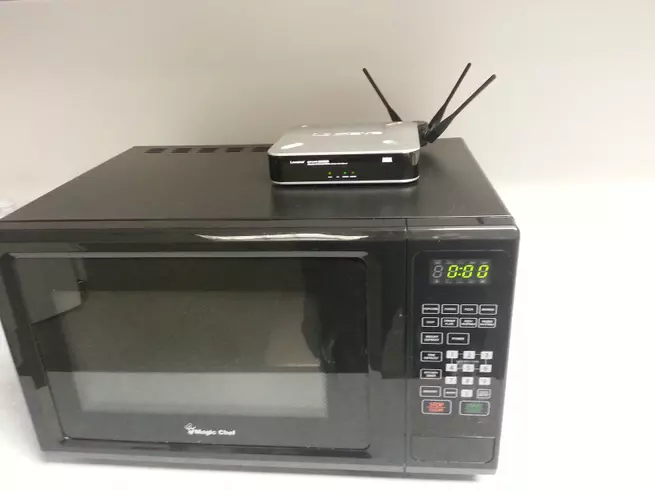
The first place to avoid is to put the router near mirrors or glass, because these elements greatly attenuate the signal. We must also avoid placing the router in the kitchen, where we have different appliances such as the microwave, refrigerator and many others that can generate interference in the WiFi wireless network, which would translate into signal problems, speed and even sporadic outages.
It would also be highly recommended to move the router as far as possible from the base of the cordless telephones, because they also tend to generate a lot of interference in the signal. Nor should we place it near a TV, because not only does it harm the router at the WiFi level, but it could cause interference on the TV itself when watching DTT channels, due to the fact that they generate electrical noise.
All of us want to have a good WiFi connection but we do not want the router to be seen, many users what they do is hide in closets or drawers, so the wireless coverage will be really bad, drastically dropping the range and also the real speed of connection. Of course, we should not place the router near metals either, because the signal will bounce and cause interference and short range problems.
Finally, if we want to cover the exterior of a house such as a patio, we should never put the router outdoors, unless it is a router designed to withstand inclement weather such as rain, temperature, sun, etc. What we could do is place the router near the window, because some coverage will come.