Almost nobody likes to get up early, especially if it is an obligation. But in the event that we have no other choice, we can always try to get up in a better mood, as will happen in the case that we are going to tell you about in these lines thanks to MetaClock.
On most occasions we use our mobile or any conventional alarm clock with an alarm to wake us up every morning. Sometimes we configure unpleasant sounds so as not to fall asleep, or softer ones to wake up in a better mood. But next we are going to talk about an application that you can use directly from your favorite internet browser. This will help you wake up every morning in a much more personal way.
We tell you everything because in these same lines we are going to talk about an application that you can use from the browser and that will allow you to wake up with any video from the popular streaming portal, Youtube. Obviously here the usual thing is that we select some multimedia content that contains music in order to wake up in a more original way. There is no doubt that the way we get up in the morning directly influences how we will be throughout the day.
Specifically, we are referring to the web application called MetaClock. We only have to go to the official website of the program to find an online alarm clock that we can use completely free of charge. makes available to us different configurations, including the aforementioned YouTube, to serve as an alarm clock. At this point it is worth mentioning that we can also use musical themes of our choice. In addition, it is worth knowing that all this does not require any installation on our computer.
Configure the program to use YouTube as an alarm clock
It is very possible that many of you have been looking for an alarm clock for some time that allows you to get up every morning with your favorite music or sounds. For this purpose, there is the utility of this tool called MetaClock. It is characterized by allowing us to play any YouTube video or a music file as a melody.
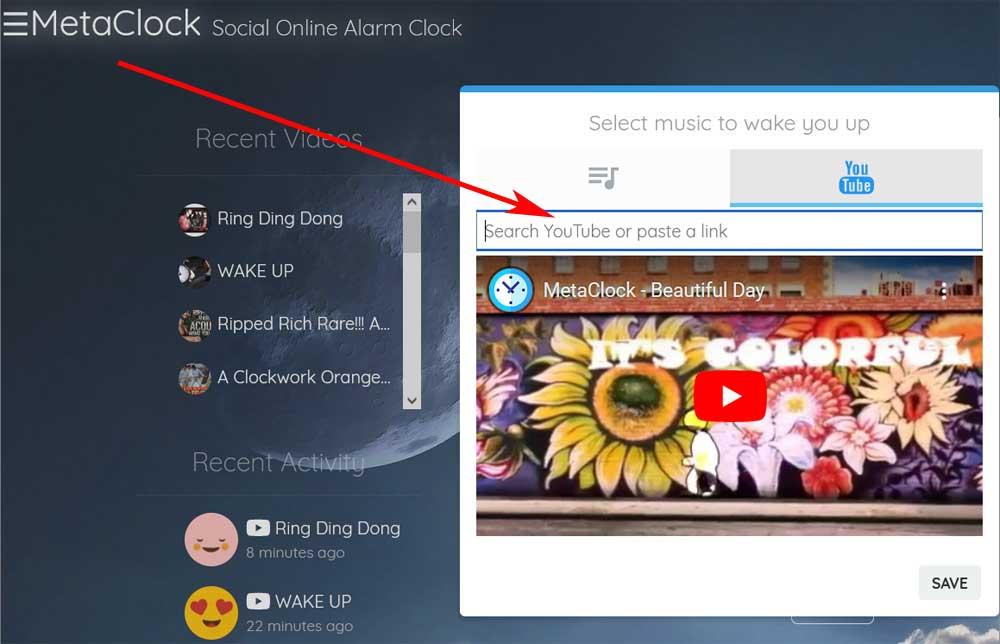
To set the time at which we want to wake up, at first all we have to do is click on the digital clock that appears on the main interface. Next, we’re going to set the melody that we want to use every morning here. We do this through the button that says Alarm Clock Music, which opens a small configuration window. This is precisely what allows us to select, either the YouTube videoor the audio file we want to use.
In this section we only have to establish the url corresponding to the video content of the streaming portal that we want to use as an alarm clock. Likewise, from this same window, we can choose a musical theme that does these same tasks. If we are going to use this application as an alarm clock from now on, we recommend that you take a look at the available options by clicking on the button Settings.
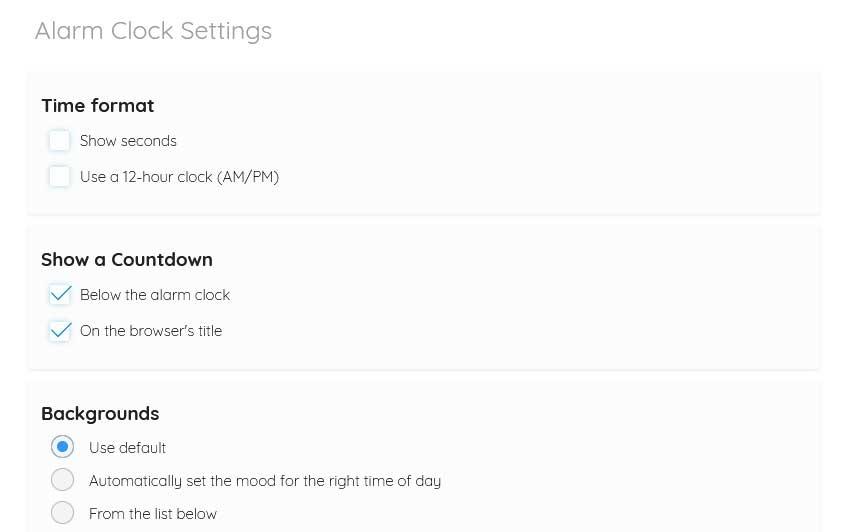
In the window that will now appear we will have the possibility of establishing a predefined format for the clock, changing the default background of the application or activating the operating system notifications for this program. In this way we will have a much more original and personalized alarm clock to use every morning.