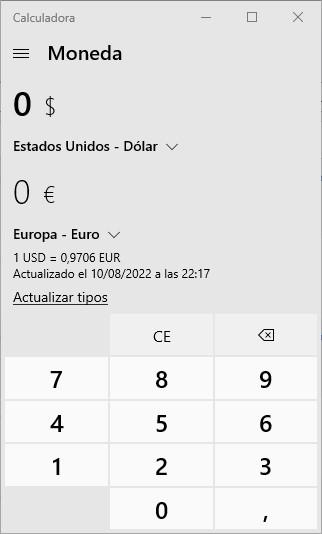
To access the section of the calculator that allows us to change between currencies, once we have executed the application, click on the three vertical lines located at the top left of the application and select Foreign exchange out of all the options shown. As soon as you choose this calculator, the application will connect to the internet to find out the most up-to-date currency exchange rates at that time.
The operation of this application is as simple as establishing the amount in the currency we know, in this case euros, and establishing the currency in which we want the conversion to be displayed with the most up-to-date exchange rates. We can choose as many currencies as we want to know the change in certain countries.
We like
The Windows Calculator application is more than enough to cover all the needs when it comes to exchanging between currencies, since it is very complete and, in addition, it is available for free in Windows, so it is not necessary to resort to third-party applications .
We do not like it
It could store a record with the changes between the different currencies, in case it was necessary to consult all the changes that we have made.
Badge
Divisa is an application designed for Windows devices with touch interface, although we can also use it on any other device without problems. This application allows us to know the most up-to-date currency exchange rates at all times. If we do not have an internet connection, it will use the most up-to-date data stored in the cache. Unlike other applications, Divisa shows us the exchange rate in all the currencies that we include without having to manually make the change.

This application uses the official changes published by the national central exchanges every day at the time of the market closing. This application is available for free download. totally free through the following link to the Microsoft Store.


Pros
The graphical interface of this application makes its use very intuitive, especially if we want to know the exchange rate in more than one country together without manually selecting each one of them.
cons
The application is only in English, although it is not necessary to have extensive knowledge of this language to get the most out of it.
XXL Currency Converter
With a very old and not very intuitive interface, we find an application that allows us to know the exchange between currencies in a very simple way. In addition, it allows us copy results to clipboardso we can use it to convert between currencies in a document that we are creating, add that data to a spreadsheet (although Excel already includes its own converter).

The change data is obtained from those published by the European Central Bank at the end of the session, so we will always have the most up-to-date exchange data at all times. This application is available for download for free through the Microsoft Store, which we can access through the following link.


Positive aspects
Allows you to copy the conversion values to use in other applications such as Excel, or in text documents.
negative aspects
The user interface needs an urgent renovation, since it has a design similar to what we could find in Windows 95 applications, not Windows XP anymore.
Callista Currency Converter
If the Windows Calculate application falls short in terms of functions and we want some graphic representation or the use of country flags, we can use the Callista Currency Converter application, an application available for free in the Microsoft Store.

With this application we can convert between different currencies and select, one by one, all the currencies whose value we want to know, a function that we miss in the Windows Calculator application. Next to the currency of each country, its corresponding flag is shown, which allows identify more quickly which country does it correspond to? It includes a browser to quickly convert between currencies if we visit websites from other countries to search and compare prices
The download of Callista Currency Converter is available for download completely free of charge through the following link.


Advantage
The graphical interface includes the flags of the countries to which the currencies correspond, making it very easy to quickly identify the corresponding currencies. It is available for download for free.
Drawbacks
It does not allow the conversion to multiple currencies together, but we can do it manually by establishing each currency to which we want to convert so that the result is displayed in the form of a list in the application.
Websites to convert between currencies
If we prefer to use a web page to convert between currencies, the number of options available is very varied.
oanda
Oanda allows us to change between the main currencies of the market, euro, dollar and pound sterling. But, in addition, it also allows us to know the value of cryptocurrencies in different currencies, so it is an excellent option if we also need to know that information. It includes a graph with the evolution of the value of currencies, a graph that covers the last 90 days, although we can extend it in time. Once we have obtained the conversion data we need, we can directly print the report.

XE currency convert
Another interesting option to take into account when knowing the value of other currencies is XE Currency Converter, a website where we can quickly change between all the official currencies in the world. In addition, it includes a graph where we can see the currency price evolutionalong with the percentage increase or decrease that it has experienced during the last day.

OCU
The Organization of Consumers and Users of Spain also includes a currency converter with which we can also convert between all the official currencies of the more than 200 countries in the world. All the data is updated in real time and at the close of the markets, so we will always know the exact exchange value at all times. It includes a price history with up to 5 years, so it is an excellent option to know the value of currencies over time. It is not necessary to be a registered user of this platform to be able to use it.

Sometimes, users complicate our lives too much when performing certain tasks. And currency exchange is one of them. If we want to know how much a price costs in other currencies, we just have to ask Google so that return the price in the currency desired, together with a history of the price evolution.

Which is the best option?
The best application to convert between currencies available for Windows, once again is the one that Windows offers us through the application Calculator. This application also allows us to convert between different measurements of volume and mass, as well as incorporating a scientific calculator that can save us from some trouble or other.
Regarding the web versions, use the Google search engine It is the best option, since the information it shows is always updated at all times, so it is not necessary to go to other websites and save them in favorites to find out the same information that we can obtain directly with Google.