USB Type C ports have become over time not only a way to communicate external peripherals with the computer at high speed, but also a replacement for the charging cables of many devices by being able to deliver much more power than the classic USB Type A. However, we find differentiated specifications in this regard and we can find cables that give 60 W, 100 W or even up to 240 W charging. how do they do it and How are the different types of USB-C cables for charging devices different?
The concept of fast charging may seem banal, but the fact of being able to have your mobile phone, pocket console or even your laptop charged in a short time and using a universal cable and, therefore, is not proprietary, It is at least something to be grateful for, as it means that we do not have to accumulate a large number of different chargers, but also simplifies and solves the repair. However, although the connectors are the same, not all USB Type-C charging cables are the same, especially when it comes to different charging powers.
How are USB-C cables different for charging my laptop?
The announcement of USB Type-C cables with a 240W charging capacity, using 48V voltage and 5A current, heralds a future where even high-end laptops will use a USB-C cable for charging. their computers. At the moment we can see cables with varied charging capacities and all this thanks to the so-called USB Power Delivery, a function that was added to this type of USB cables that allows the supply voltage to be varied with several different profiles.
| Profile | Voltage | Intensity | Power |
|---|---|---|---|
| #1 | 5V | 0.1 to 3A | 0.5 to 15W |
| #2 | 9V | From 1.67 to 3 A | 15 to 27W |
| #3 | 15V | 1.8 to 3A | 27 to 45W |
| #4 | 20V | 2.25 to 3A 3 to 5A |
45W to 60W |
| #4 (Special Wire) | 20V | 3 to 5A | 60W to 100W |
| #5 (Special Wire) | 48V | 3 to 5A | 144W to 240W |
As can be seen there are two types of cable mainly, the one with more power uses wider pins and cables than the usual ones, since the conventional ones are not designed to support those power levels. However, the cables for higher power are compatible to be used with the lower ones, but we do not recommend it, not for the health of the cable, but for the fact that it is wasteful to use a USB cable designed to transmit high power for much more modest devices. .
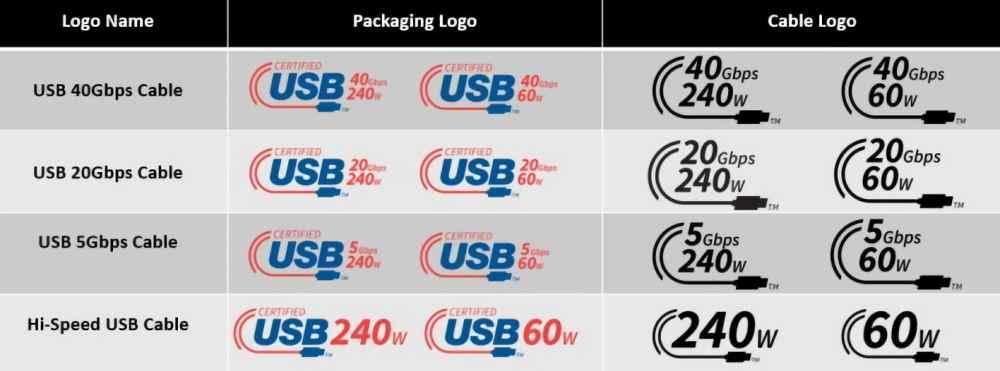
Therefore, when buying a cable for the power supply of your laptop in the future, you should look at the type of cable you buy, since not all of them will work and unfortunately they will all be the same in appearance. Therefore, it will be necessary to know how to catalog and differentiate these cables from the rest. Sadly, there’s no such thing as color coding to tell them apart, and there’s nothing more infuriating than being unable to use a device because you don’t have the right USB-C charging cable.
How do they differ?
The chaos so far has reached such great levels that the USB Forum itself has had to change the way USB cables are named and cataloged to simplify the proper purchase of the cable, whatever we want to use it for. So it all comes down to looking in the box carefully when buying a new one.