Although the youngest consider that Facebook is a social network for older people, the truth is that, with almost 20 years in the market, is the social platform with the largest number of active users, well ahead of the figures for Instagram and TikTok, the latter focused solely on a young audience. Twitter, with 300 million users, continues to be the least used social network, even though it is the most used by companies and personalities of all kinds.
Mark Zuckerberg’s platform is ideal for looking for people on the Internet and, in addition, it makes available to us a large number of tools to maintain our privacy, even if the platform does not offer sufficient security mechanisms so that this data is accessible to others. as demonstrated in the Cambridge Analytica scandal. One of the options that many users use when they want to stop viewing posts from friends, family or any other Facebook account does not stop following it, to prevent it from asking us for the reasons that led us to make that decision, but rather use the Hide function available on Facebook.
Hide Facebook posts
This function allows hide all posts of that person in our news feed, so that none of their posts appear. To hide the publications on Facebook of anyone we follow, we just have to click on the three horizontal points located on the right side of the account name, just to the left of the X. Next, we must select the option Pause at XXX for 3o days / Hide XXX for 30 days (While some users are shown as pause, others are shown as hide).
Retrieve your friends’ posts on Facebook
From this moment on, that person’s posts will no longer show up in our news feed. If we want these to be shown again, we must access the Facebook configuration options, specifically the Settings and privacy section. Within this menu, click on News Feed Preferences / feed preferences (it can be displayed with different names just like the function that allows you to hide the posts).

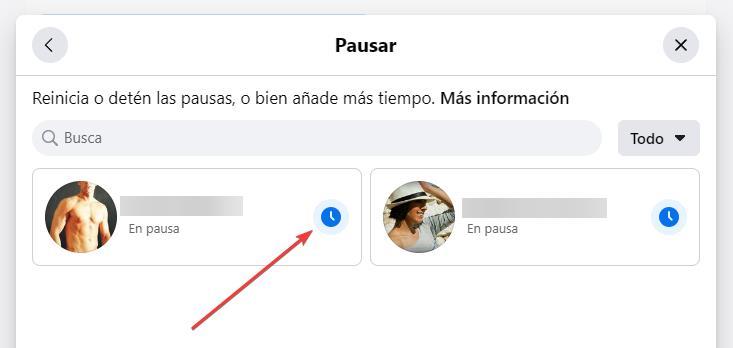
Next, click on the section pause / temporarily hide (it can also be displayed with different names) to access the list of people from whom we have hidden their posts on our news feed.

To see the publications of the people we follow on Facebook but that we had temporarily hidden, for 30 days using the function of this platform, we just have to click on the clock icon to deactivate the pause and all the publications return to show up in our feed.
Another option is to wait the 30 days that Facebook establishes by default to hide the publications.